


Hoco DI43 Robot 2.4G Wireless Gaming Mouse Price in Bangladesh – High-Precision, Ergonomic, and Rechargeable
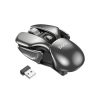
For serious gamers and professional users in Bangladesh, the Hoco DI43 Robot 2.4G Wireless Gaming Mouse offers precision, speed, and comfort in a sleek, portable design. Available at Amar360.com, this mouse combines advanced optical sensor technology, ergonomic engineering, and a long-lasting rechargeable battery for uninterrupted gaming sessions.
Whether you’re gaming competitively, editing videos, or working long hours, the DI43 ensures responsive and smooth performance. With adjustable DPI, silent micro-switches, and durable materials, this wireless gaming mouse is a perfect blend of style, function, and affordability.
Get your Hoco DI43 Robot 2.4G Wireless Gaming Mouse in Bangladesh today and enjoy the best price with reliable service from Amar360.
💰 Hoco DI43 Robot 2.4G Wireless Gaming Mouse Price in Bangladesh
Price: 1,750 BDT
Brand: Hoco
Model: DI43
Availability: In stock at Amar360.com
This price makes the DI43 one of the most affordable high-performance wireless gaming mice in Bangladesh, offering features typically found in more expensive devices.
🌟 Product Overview
The Hoco DI43 Robot Wireless Gaming Mouse is designed for gamers, professionals, and students who need accurate tracking, comfort, and durability. Its PAW3065 optical sensor delivers high-precision movement, while the 2.4G wireless connection ensures stable, low-latency performance.
Key highlights include:
Ergonomic design for right-handed users
Silent micro-switches for distraction-free clicking
Adjustable DPI for customizable sensitivity
Long-lasting rechargeable battery with 30 hours runtime
Robust construction with ABS and aluminum alloy
The DI43 is a plug-and-play solution, compatible with Windows, macOS, and Linux. Its compact size (111x65x34 mm) and lightweight 85g design make it portable for laptops, home setups, or professional workstations.
⚙️ Key Features of Hoco DI43 Wireless Gaming Mouse
🖱️ 1. Ergonomic Right-Handed Design
The DI43 features a contoured shape that fits naturally in the hand, with a non-slip grip for stability during intense gaming or long working hours. The lightweight 85g design reduces fatigue, making it suitable for extended use.
🎯 2. Advanced PAW3065 Optical Sensor
The PAW3065 optical sensor ensures precise tracking on multiple surfaces, allowing for accurate gameplay and professional-level performance. Whether you’re on wood, plastic, or a mouse pad, the sensor registers movements accurately.
⚡ 3. 2.4G Wireless Connectivity
The 2.4G wireless technology provides a low-latency connection without interference, delivering smooth and uninterrupted performance. Simply plug the USB receiver into your PC, and you’re ready to go.
🔋 4. Rechargeable 300mAh Battery
The DI43 includes a built-in 300mAh rechargeable battery capable of 30 hours of continuous use. Recharge via micro-USB in just 2 hours, and enjoy long gaming sessions without worrying about replacing batteries.
🔇 5. Silent Micro-Switches
With up to 5 million clicks lifespan, the silent micro-switch buttons allow noise-free operation. This is perfect for shared workspaces, libraries, or late-night gaming.
🎮 6. Adjustable DPI Levels
Switch between 800, 1200, and 1600 DPI using the dedicated button to match your preferred sensitivity. This versatility allows you to fine-tune mouse responsiveness for fast-paced games, precise editing, or general office work.
🏗️ 7. Robust Build Quality
Made with ABS and aluminum alloy, the DI43 is impact-resistant and durable, providing a premium feel without sacrificing portability.
🔌 8. Plug-and-Play Simplicity
No drivers or software are required. Just insert the USB receiver, turn on the mouse, and it’s ready to use on Windows, macOS, or Linux systems.
📦 Specifications at a Glance
| Specification | Details |
|---|---|
| Brand | Hoco |
| Model | DI43 Robot |
| Material | ABS + Aluminum Alloy |
| Dimensions | 111 x 65 x 34 mm |
| Weight | 85 g |
| Sensor | PAW3065 Optical |
| Connectivity | 2.4G Wireless (USB Receiver) |
| Battery Capacity | 300mAh Rechargeable |
| Battery Life | Up to 30 Hours |
| DPI Settings | 800 / 1200 / 1600 |
| Buttons | 6 Programmable |
| Compatibility | Windows, macOS, Linux |
| Key Lifespan | 5 Million Clicks (Silent Keys) |
🏆 Benefits of Using Hoco DI43 Robot Gaming Mouse
Enhanced Gaming Experience: Fast, precise movements and adjustable DPI provide competitive advantage in FPS, MOBA, and strategy games.
Comfortable Handling: Ergonomic design and non-slip grip reduce strain during long gaming sessions.
Silent Operation: Noise-free clicks ideal for late-night gaming, office use, or shared spaces.
Long Battery Life: Rechargeable battery lasts up to 30 hours, reducing downtime and dependency on disposable batteries.
Versatility: Works on most surfaces and is compatible with major operating systems without installing drivers.
Durability: High-quality materials and long-lifespan switches ensure the mouse withstands intensive use.
Portable Design: Lightweight and compact, easy to carry with laptops or gaming kits.
⚡ How to Use the Hoco DI43 Wireless Gaming Mouse
Insert the USB Receiver: Plug the included 2.4G receiver into your PC or laptop.
Power On: Slide the power switch to “ON” — the LED indicator confirms connection.
Adjust DPI: Use the DPI switch to select 800, 1200, or 1600 DPI.
Operate Normally: Use the left, right, scroll wheel, forward, and backward buttons for smooth navigation.
Recharge When Needed: Connect the micro-USB cable to recharge; full charge takes ~2 hours.
🖥️ Use-Cases for Hoco DI43 Robot Wireless Mouse
Gaming: FPS, MOBA, RPG, and strategy games with fast response and precise tracking.
Office Work: Silent keys ensure no disturbance while typing or multitasking.
Remote Work: Compatible with Windows, macOS, and Linux for smooth workflow.
Video/Photo Editing: Adjustable DPI for pixel-perfect precision.
Travel & Portability: Compact design fits easily in laptop bags or backpacks.
🔍 Comparison with Similar Wireless Gaming Mice in Bangladesh
| Model | DPI | Battery | Connectivity | Price (BDT) | Key Feature |
|---|---|---|---|---|---|
| Hoco DI43 Robot | 800/1200/1600 | 300mAh, 30h | 2.4G Wireless | 1,750 | Ergonomic, Silent, Rechargeable |
| Logitech M238 | 1000 | AA Battery | 2.4G Wireless | 1,800 | Premium Brand |
| Redragon M602 | 2000 | AA Battery | Wired | 1,700 | High DPI Gaming |
| Rapoo 7100P | 1600 | 400mAh | 2.4G Wireless | 1,600 | Lightweight & Silent |
| HP X3000 | 1200 | AA Battery | Wireless | 1,400 | Affordable General Use |
The Hoco DI43 Robot offers best value in Bangladesh with its combination of ergonomics, precision, rechargeable battery, and silent operation, perfect for gamers and professionals alike.

💡 Buying Tips for Wireless Gaming Mice in Bangladesh
Check Sensor Type: Optical sensors like PAW3065 provide precision and durability.
Adjustable DPI: Essential for gaming or creative work requiring different sensitivity levels.
Battery Life: Rechargeable mice with long runtime reduce downtime.
Ergonomics: Ensure comfort for extended use.
Material & Build: ABS + Aluminum alloy ensures lightweight durability.
Compatibility: Plug-and-play on Windows, macOS, and Linux is convenient.
Warranty & Support: Always buy from trusted sellers like Amar360.
❓ Frequently Asked Questions (FAQs)
Q1: Is the Hoco DI43 suitable for gaming?
Yes, with adjustable DPI, silent micro-switches, and precise PAW3065 optical sensor, it is ideal for gaming.
Q2: How long does the battery last?
Up to 30 hours on a single charge, rechargeable via micro-USB in ~2 hours.
Q3: Can I use it on a laptop or Mac?
Yes, it works with Windows, macOS, and Linux without installing software.
Q4: Are the clicks noisy?
No, it has silent micro-switches, making it noise-free.
Q5: How portable is it?
Compact (111x65x34mm) and lightweight (85g), suitable for travel or office use.
Q6: Does it require drivers?
No, it is plug-and-play via 2.4G USB receiver.
Q7: Can it work on different surfaces?
Yes, the PAW3065 optical sensor supports multiple surfaces including wood, plastic, and mousepads.
Reviews
There are no reviews yet.